Introduction
SQLite is database software that runs inside the application. The program calls SQLite functions directly, and SQLite reads and writes the local database file.
When I first encountered SQL, “database” suggested a separate service: an application connects to a server, sends a query, and waits for a response. SQLite changes that architecture. The SQL engine is a library running inside the application process, and it reads and writes the database file directly.
That difference is visible throughout the Inventory-cli-app repository. The C program compiles SQLite’s source with its own source files, opens data.db, calls the SQLite C API, and closes the connection during shutdown. There is no separate SQLite server to install or contact. This makes the database suitable for the local command-line application used in the project.
Two different architectures
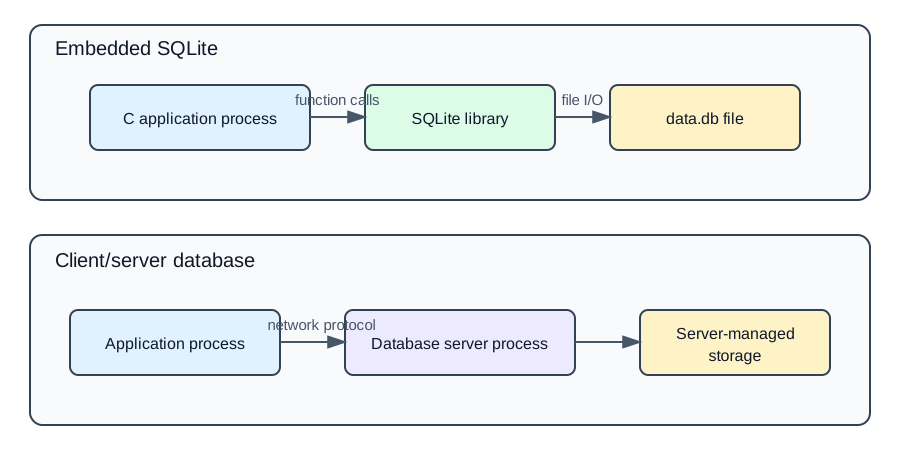
On the SQLite side, a function call moves from application code into library code within the same process. The library manages the database file. This is called an embedded database because the database engine is included in the application.
On the client/server side, the application uses a client library and a communication protocol to reach a separate database process. That separate process owns the database storage, so the application and database communicate across a service boundary.
Neither model is universally better. A separate server can centralize remote access, administration, and high-concurrency workloads. An embedded database removes that service boundary and can simplify deployment for local software. The requirements decide which trade-off matters.
How SQLite enters this executable
SQLite publishes an amalgamation: the database engine’s C source combined into one source file named sqlite3.c, with its public declarations in sqlite3.h. The repository stores these as external/src/sqlite3.c and external/include/sqlite3.h. This gives a C project a practical way to compile SQLite together with its own source files.
The modular CMake build collects the project’s src/*.c files and external/src/*.c, then passes all of them to add_executable. SQLite is therefore compiled into program alongside the inventory code. It is not launched as another executable.
The repository also contains a distribution-oriented amalgamation/ directory. Its README documents this command for the combined inventory source:
gcc inventory-system.c sqlite3.c -o inventory_system
Here “amalgamation” appears at two levels: SQLite supplies its engine as sqlite3.c, while the project also combines its own application modules into inventory-system.c. The compiler still receives SQLite as a separate C translation unit in the documented command.
Opening the database file
initialize_db() calls connect_db("data.db"). The connection module stores the result in a file-local pointer:
static sqlite3 *db_instance = NULL;

int rc = sqlite3_open(db_name, &db_instance);
sqlite3_open() opens an existing file or creates it when appropriate. The returned sqlite3 * is a connection handle, meaning a value used by the program to refer to the open database. On success, the project enables foreign-key enforcement for that connection with PRAGMA foreign_keys = ON. Other modules call get_db() to retrieve the shared connection pointer.
This is documented repository behavior. The judgement that it suits a local CLI follows from the architecture: the executable and its data.db can live together without configuring a network database service.
A prepared statement is a step-by-step process
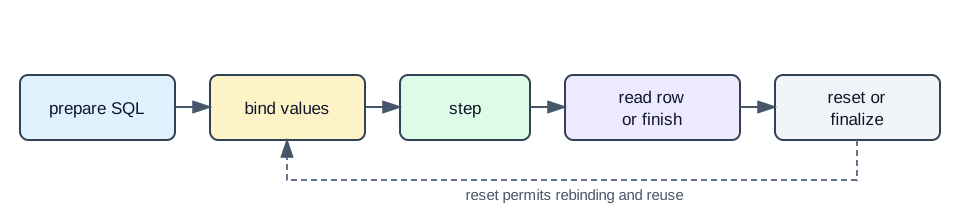
The project’s database functions repeatedly follow the core SQLite statement lifecycle:
1. Prepare SQL
prepare_stmt() wraps sqlite3_prepare_v2(). Preparation turns SQL text into a sqlite3_stmt object. This object is a prepared statement, which is SQLite's prepared form of the SQL command. Preparing it does not yet run the statement.
For example, db_add_item() uses placeholders rather than joining user values into the SQL string:
char *sql = "INSERT INTO items (item_code, item_name) "
            "VALUES (?, ?);";
2. Bind application values
The function binds the two C strings to parameter indexes 1 and 2:
sqlite3_bind_text(stmt, 1, item_code, -1, SQLITE_TRANSIENT);
sqlite3_bind_text(stmt, 2, item_name, -1, SQLITE_TRANSIENT);
Binding means placing C values into the ? placeholders in the prepared statement. It keeps data separate from the SQL structure. SQLITE_TRANSIENT tells SQLite to make the copy it needs before the call returns. Elsewhere the repository uses sqlite3_bind_int() and sqlite3_bind_double() for numeric values.
3. Step the statement
sqlite3_step() runs the prepared statement one step at a time. An INSERT, UPDATE, or DELETE normally finishes with SQLITE_DONE. A query returns SQLITE_ROW while a row is available and later SQLITE_DONE when no more rows remain.
The project’s step_and_check() helper encodes those two expectations. Write functions call it expecting completion. Query functions often step in a loop and read the current row.
4. Read typed columns
db_get_all_items() uses the typed column functions only while sqlite3_step(stmt) == SQLITE_ROW:
item->item_id = sqlite3_column_int(stmt, 0);
const unsigned char *code = sqlite3_column_text(stmt, 1);
item->total_value = sqlite3_column_double(stmt, 4);
Column indexes start at zero, unlike bind parameter indexes, which start at one. This difference is easy to miss when reading the code. Text is copied into the project’s fixed-size structures before the statement is finalized.
5. Reset or finalize
Some inventory operations reuse a prepared statement inside a loop. They call sqlite3_reset() after one execution so new values can be bound and the statement can run again. When the owning function finishes, it calls sqlite3_finalize(). Finalizing means releasing the prepared statement and its resources.
The database functions initialize statement pointers to NULL and converge on cleanup: labels. Each non-null statement is finalized there, including error paths. This is an important C pattern: acquisition may happen at several points, but cleanup has one auditable destination.
Closing the connection
disconnect_db() calls sqlite3_close(db_instance) and then clears the stored pointer. main() routes its exit paths through that function. Closing the connection should happen after prepared statements have been finalized because an outstanding statement can prevent a connection from closing successfully.
The current project checks many important results—opening, sqlite3_exec(), preparation, stepping, transaction helpers, and selected extended constraint codes—but it does not check every SQLite return value. Bind results, sqlite3_finalize(), and sqlite3_close() are not inspected. Also, the connection failure branches clear db_instance without closing a handle that SQLite may have returned. Those are source-observed cleanup gaps, not invented runtime failures.
Return codes are part of the API
SQLite operations report results such as SQLITE_OK, SQLITE_ROW, and SQLITE_DONE; errors have primary and extended forms. The repository turns many of these into its own domain results, including unique-constraint and foreign-key failures.
Its helper functions also print sqlite3_errmsg(db) or the error string returned by sqlite3_exec(). The latter is released with sqlite3_free(). This matters because error handling in C includes ownership: reporting an error is only half the work if an allocated message, statement, or connection remains live.
Why this architecture fit the project
For a local command-line inventory exercise, SQLite gives the program relational tables, joins, constraints, and transactions while keeping the data in a local file. The application can be compiled with the engine source and run without provisioning a database server. That is a design judgement based on the project’s deployment model, not a claim that SQLite is always the best database.
The boundary becomes more important when requirements change. A system serving many remote clients, requiring independent database operations teams, or sustaining substantial concurrent writes may benefit from a client/server database. SQLite can support concurrency, but its in-process, file-oriented architecture has different coordination and operational characteristics.
What the repository demonstrates
- Documented: the README describes SQLite-backed inventory records, generated
data.db, CMake compilation, and the single-file build option. - Source-demonstrated: CMake compiles
sqlite3.c; initialization opensdata.db; database functions prepare, bind, step, read, reset, finalize, and close through the C API. - Reflection: embedded deployment is a good fit for this local CLI’s learning goals, while return-code and cleanup coverage could be tightened before treating the database layer as production infrastructure.
Key takeaways
- SQLite runs as an in-process library; it is not contacted through a separate database server process.
- The repository compiles the SQLite amalgamation source into the inventory executable.
- A prepared statement moves through prepare, bind, step, column reading or completion, and finalization.
SQLITE_ROW,SQLITE_DONE, errors, and resource ownership must be handled deliberately.- Cleanup labels help the C functions finalize every statement reached along success and failure paths.
- Embedded and client/server databases solve different deployment and operational problems.