Introduction
A reliable number prompt has two stages: read one whole line, then check that the whole line is a valid number. This makes bad input recoverable instead of leaving it for the next prompt. The program should not accept only the valid beginning of a line and ignore the rest.
Asking a passenger for a route ID sounds simple until the input is not simple. A user can press Enter without typing a number, enter 12abc, paste more text than the buffer holds, or provide a value that does not fit in an int.
The ferry-ticket project separates this problem into layers. Its documented input helpers include read_line(), which reads with fgets(); parse_int(), which converts text; and prompt_int(), which repeats the prompt until conversion succeeds. That separation is the useful mental model:
- read one bounded line;
- decide whether the complete line was captured;
- parse the text without changing the output yet;
- validate the entire conversion;
- assign the result only after every check passes.
Why reading and conversion should be separate
fgets() reads text. strtol() interprets that text as a number. Neither function alone answers every validation question. This separation is useful because reading deals with the input stream, while parsing deals with the meaning of the text.
Reading first gives the program a complete string that can be inspected and retried. The parser can distinguish 12 from 12abc, report invalid input without leaving the same bad token waiting in stdin, and check whether the result fits the program's destination type.
This is more precise than saying the functions are “safe.” They provide the information needed to write a safer input path; the caller still has to use that information correctly.
What fgets() guarantees
For a buffer with capacity cap, this call reads at most cap - 1 characters:
if (fgets(buffer, (int)cap, stdin) == NULL) {
    /* end-of-file or a read error before any characters were obtained */
}
On an ordinary successful read, fgets() appends a null terminator, the \0 character that marks the end of a C string. If a newline is encountered before the limit, that newline is retained in the buffer. The input 42 followed by Enter is therefore usually stored as:
'4' '2' '\n' '\0'
That retained newline is not a problem for strtol() if the parser permits trailing whitespace. It becomes a problem only when code assumes fgets() removes it or treats every remaining character as invalid.
Do not use the buffer after fgets() returns NULL unless the program has separately established that its contents are valid. On a read error, the standard does not promise a useful null-terminated string.
A full buffer is not necessarily a full line
If no newline appears in the returned buffer, one of three things happened:
- the line ended at end-of-file without a final newline;
- the entered text exactly filled the available character slots and the next stream character is the newline;
- the input is longer than the buffer and unread characters remain in
stdin.
The third case can corrupt the next prompt. If a 16-byte buffer captures only the beginning of a long number, the following call to fgets() receives the leftover characters instead of fresh input.
A line reader can inspect the next character when the buffer contains no newline. If that character is neither newline nor end-of-file, it drains characters until newline or end-of-file and reports the line as too long. This preserves the boundary between prompts.
bool read_line(char *buffer, size_t cap) {
    if (buffer == NULL || cap < 2 || cap > INT_MAX) {
        return false;
    }

    if (fgets(buffer, (int)cap, stdin) == NULL) {
        return false;
    }

    char *newline = strchr(buffer, '\n');
    if (newline != NULL) {
        *newline = '\0';
        return true;
    }

    int next = getchar();
    if (next == '\n' || next == EOF) {
        return true;
    }

    while (next != '\n' && next != EOF) {
        next = getchar();
    }
    return false;
}
This is a hardened reference implementation, not a verbatim excerpt from the ferry repository. The current read_line() also uses fgets(), drains the rest of a line when its buffer contains no newline, and trims a retained newline. It does not report whether the line was truncated; it simply discards any remaining characters before the next prompt.
strtol() tells us where parsing stopped
Unlike atoi(), strtol() returns an end pointer through its second argument. The end pointer tells the program where the conversion stopped:
char *end;
long value = strtol(text, &end, 10);
end points just after the final character used in the number. That makes these inputs distinguishable:
| Input text | Conversion | Where end points |
Parser decision |
|---|---|---|---|
"12" |
12 | null terminator | Accept |
" 12 \t" |
12 | space after 12, then trailing whitespace |
Accept after scanning whitespace |
"12abc" |
12 | a |
Reject partial conversion |
"hello" |
0 | same address as the input start | Reject: no conversion |
"" |
0 | same address as the input start | Reject: no conversion |
The numeric return value alone cannot distinguish a valid zero from a failed conversion. The check end == text supplies that missing information. If both pointers are equal, no characters were converted.
The complete validation path
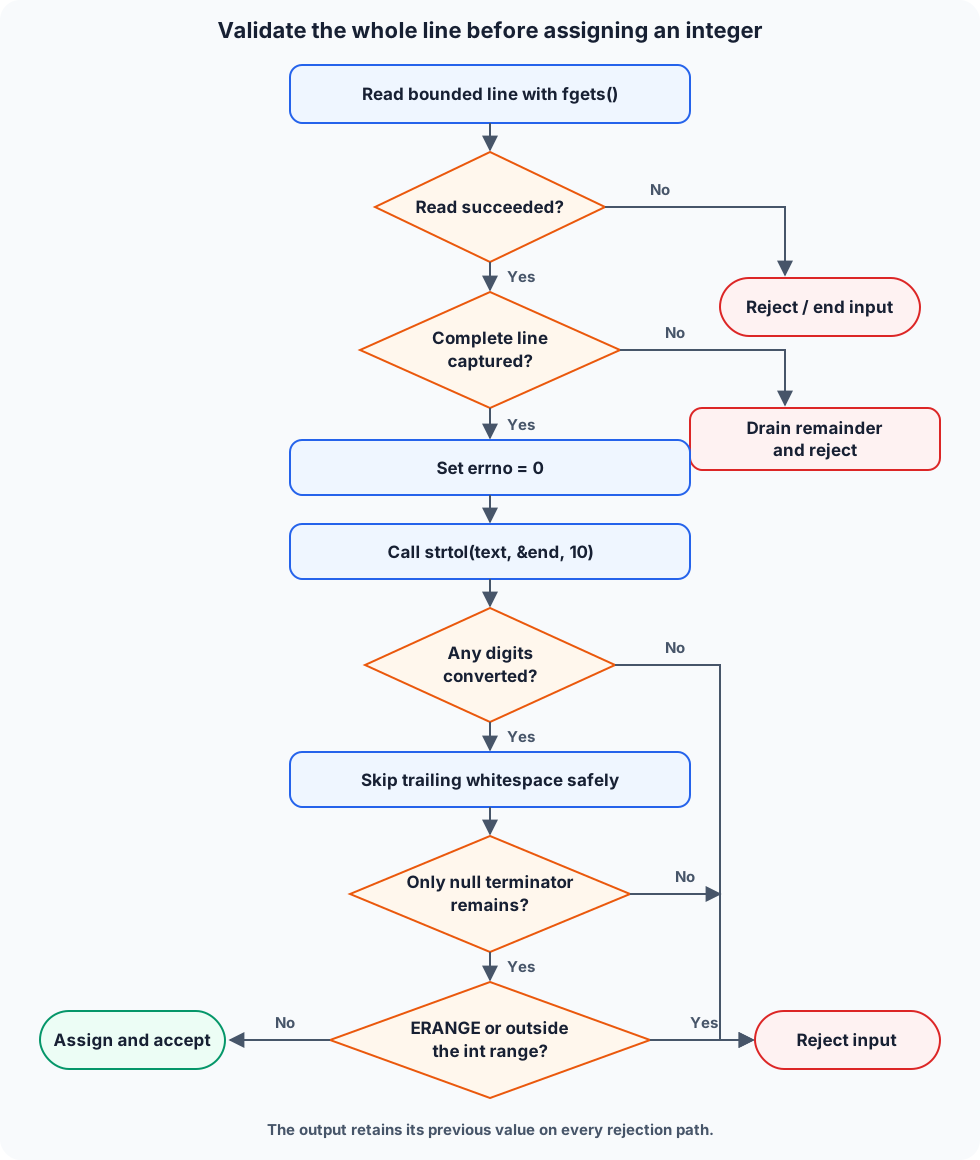
The parser below shows the checks in code order:
bool parse_int(const char *text, int *out) {
    if (text == NULL || out == NULL) {
        return false;
    }

    errno = 0;
    char *end;
    long value = strtol(text, &end, 10);

    if (end == text) {
        return false;
    }

    while (*end != '\0' && isspace((unsigned char)*end)) {
        end++;
    }

    if (*end != '\0') {
        return false;
    }

    if (errno == ERANGE || value < INT_MIN || value > INT_MAX) {
        return false;
    }

    *out = (int)value;
    return true;
}
The ferry project's parse_int() uses strtol(), rejects an empty conversion and trailing non-whitespace, and calls isspace() with an unsigned char cast. The code above is a hardened reference implementation rather than a copy: it additionally resets and checks errno and verifies the result fits in int before casting.
Why errno must be reset
When the mathematical result is outside the range of long, strtol() returns a boundary value and sets errno to ERANGE. errno is a library-provided error indicator that records information about a failed operation, while ERANGE specifically indicates a range error. Successful library calls are not generally required to reset an old error value. Therefore this order matters:
errno = 0;
long value = strtol(text, &end, 10);
if (errno == ERANGE) {
    return false;
}
Checking errno without first setting it to zero can mistake an earlier, unrelated error for a failure of the current conversion.
long and int have separate ranges
strtol() returns a long, while the ferry program's IDs, capacities, and ticket quantities are stored as int. A value can fit in long but not in int, especially on systems where long is wider.
That is why ERANGE is not the final check. The parser must also compare with INT_MIN and INT_MAX before the cast. Assigning only after those comparisons prevents the caller's previous value from being overwritten by invalid input.
Trailing whitespace is allowed; trailing text is not
After conversion, the loop advances over spaces, tabs, and a retained newline. It accepts the input only when the next character is the null terminator.
The cast in this expression is small but important:
isspace((unsigned char)*end)
The character-classification functions accept EOF or a value representable as unsigned char. On implementations where plain char is signed, a non-ASCII byte may become a negative value. Passing that negative value directly to isspace() has undefined behavior. Converting through unsigned char produces a valid argument.
The pointer increments only while it points at a non-null whitespace character. Checking *end != '\0' first makes the loop's boundary explicit.
Output predictions
Assume the complete parser above and a destination whose current value is 99:
int result = 99;
bool ok = parse_int(input, &result);
input |
ok |
result afterward |
Reason |
|---|---|---|---|
"27" |
true |
27 | Entire string is a decimal integer |
" -4 " |
true |
-4 | Leading and trailing whitespace are permitted |
"12abc" |
false |
99 | end stops at a |
"" |
false |
99 | end == input; no digits converted |
a value greater than LONG_MAX |
false |
99 | strtol() reports ERANGE |
a value within long but above INT_MAX |
false |
99 | Destination-type range check fails |
These are demonstrated outcomes of the displayed parser, not claimed test results from the repository.
Application-specific validation happens after parsing. A route ID might allow any representable positive integer before lookup, while ticket quantity and route capacity must be greater than zero. The project documents separate helpers such as is_positive_int() for that policy. Keeping syntax conversion separate from business rules makes both easier to test.
Why not use scanf("%d", &value)?
scanf() is not inherently unsafe in every use. A program that checks its return value, handles range and width correctly, and manages the remaining stream can use it deliberately.
The difficulty in an interactive menu is recovery. If %d cannot convert abc, the offending characters can remain in stdin, so the next attempt sees the same text. A successful %d conversion can also leave trailing characters such as abc behind after the numeric prefix. Mixing numeric scanf() calls with later line input makes newline handling easy to get wrong.
Reading a bounded line first makes recovery explicit: one prompt owns one line. strtol() then reports how much of that line was a valid number.
Repository facts and verification boundary
- Documented project behavior: the ferry application uses
read_line()withfgets(),parse_int()for text conversion, andprompt_int()to retry invalid integer input. It also separates positivity and other application rules into validation helpers. - Demonstrated behavior: the complete parser in this article rejects
12abc, preserves the destination on failure, accepts trailing whitespace, and distinguisheslongoverflow from anintrange failure. - Design reflection: line-based input makes the CLI's prompt boundaries and recovery rules clearer than mixing token conversion directly with the input stream.
- Verified against the current source:
read_line()drains remaining characters when no newline was read and trims a retained newline;parse_int()usesstrtol(), rejects partial conversions, accepts surrounding whitespace, and casts characters tounsigned charforisspace(). It does not checkerrnoor theintrange, so the stronger parser above remains reference code.
Key takeaways
fgets()limits how many characters enter the buffer, retains a newline when it fits, and null-terminates a successful ordinary read.- A bounded read can still capture only part of an overlong line; drain the remainder before prompting again.
strtol()exposes the stopping point throughend, allowing12abcto be rejected rather than silently accepted as 12.- Set
errnoto zero before conversion and rejectERANGEafterward. - Check the
longresult againstINT_MINandINT_MAXbefore assigning it to anint. - Permit only whitespace after the numeric portion, and call
isspace()with anunsigned charvalue. - Assign the output only after all checks pass, then apply application rules such as “must be positive” separately.